gantt
title Repeating Timer Example (time in seconds)
dateFormat x
axisFormat %S
todayMarker off
section TIMER
NOT STARTED :done, 0, 1000
k_timer_start(500, 500) :active, 1000, 3750
k_timer_stop() :crit, 3750, 4500
section LED
low :done, 0, 1500
high :active, 1500, 2000
low :done, 2000, 2500
high :active, 2500, 3000
low :done, 3000, 3500
high :active, 3500, 3750
low :done, 3750, 4500
Zephyr: Timers, Threads, Atomic Services & Work Queues
BME554L - Fall 2026
Dr. Mark Palmeri, M.D., Ph.D.
Duke University
September 27, 2026
What are the challenges with sleep / delay statements?
- Overall timing of the main loop hard to estimate with multiple ”tasks”.
- Adding / removing features can disrupt all of the timing.
What are the challenges with super-loops?
- Nested conditional statements testing for timing of events can make the code difficult to read and maintain.
- Leads to “code spaghetti” and “spaghetti timing”.
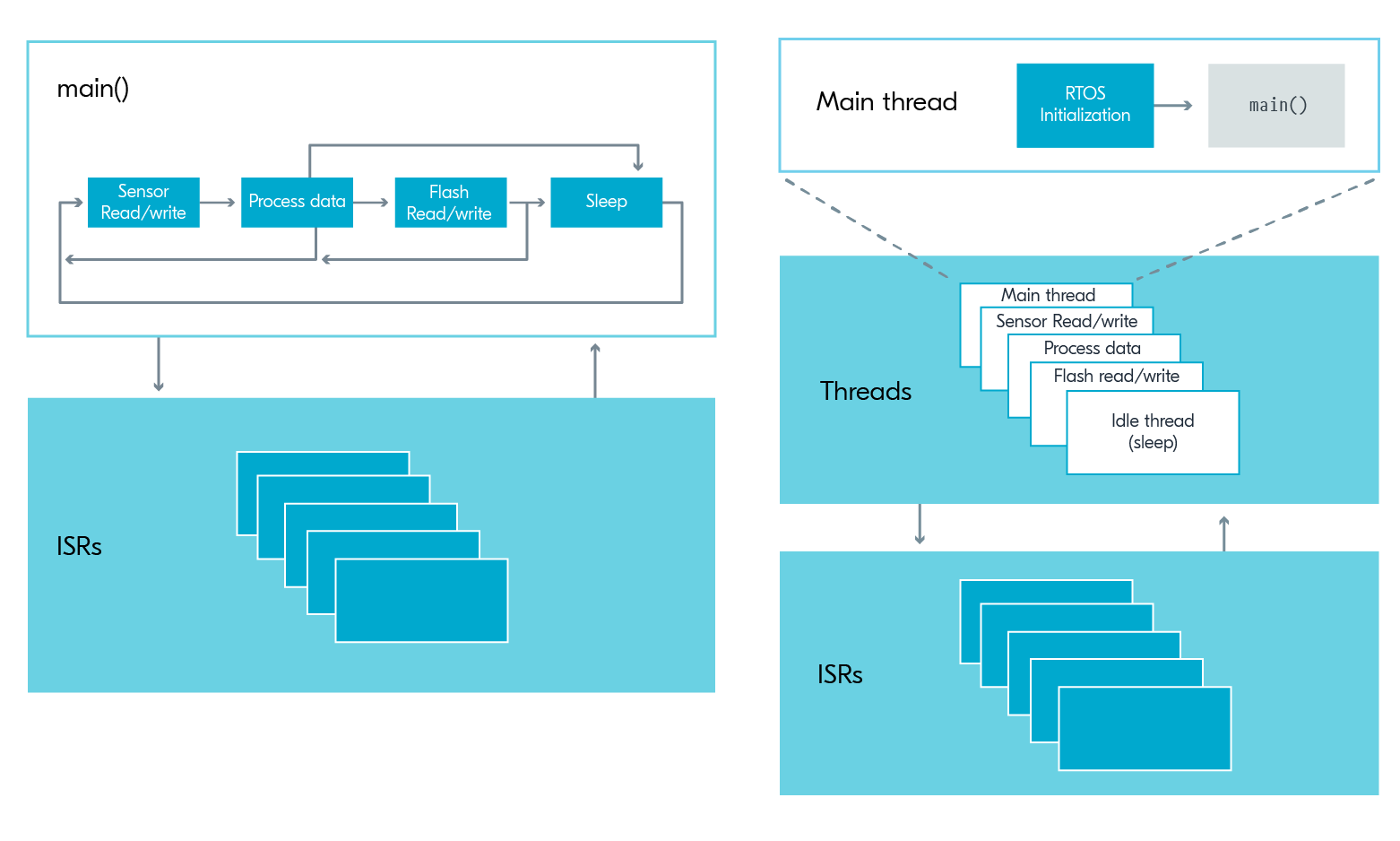
Threads
Important
The use of threads does not change the state machine implementation of your code. It simply allows you to implement the state machine in a more modular way.
System vs. User Threads
- Zephyr’s kernel starts a system thread and a user-space thread by default.
- User can add tasks to the system thread and/or create user threads.
Thread Priority
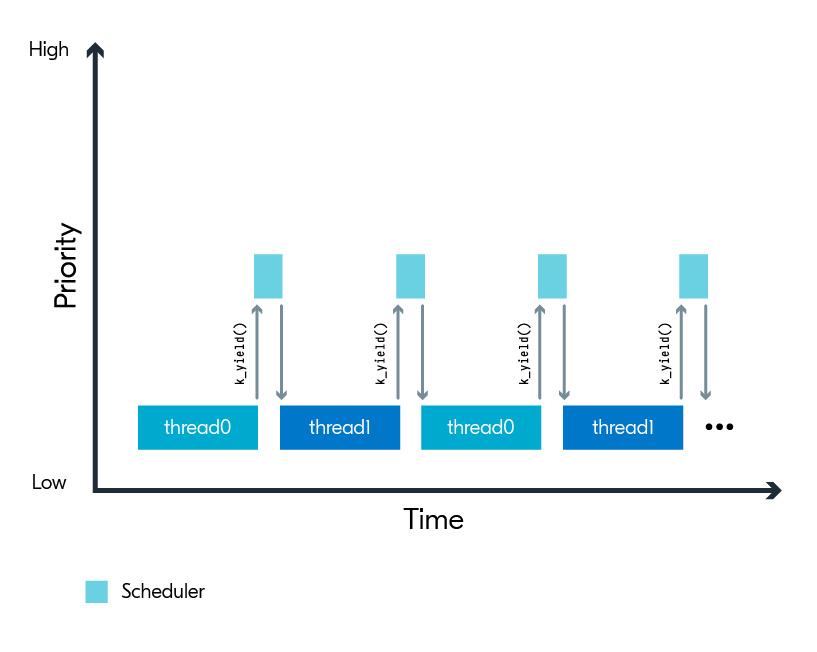
- Threads can also wait for events to post and for other threads to complete processes.
Atomicity and Thread Safety
- If multiple threads being able to operate on common resources (e.g., variables), how do we make sure that one thread doesn’t interrupt another thread in the middle of its operation on that resource? This is where atomic operations come in.
- An atomic operation is an indivisible operation that either completes entirely or does not execute at all.
- Atomic operations are used to prevent race conditions and ensure thread safety when multiple threads access shared resources.
- In Zephyr, atomic operations can be performed using the
atomicAPI, which provides functions for atomic read, write, and modify operations on variables.
- We have already used atomic operations in the GPIO lab to set and clear flags in ISRs. In this upcoming lab, we will use atomic operations to set and clear flags in timer handler functions as well.
Timer Threads
In addition to ISR priority and thread priority yielding, the system also has timers for high temporal accuracy tasks (one-time or repeated).
- Timers are managed by the kernel (system).
- Timers are always available (i.e., no need to include libraries or enable kernel configurations)
- Like ISR callback functions, timer handler functions should not consume significant resources / take much time to execute.
- A handler function at the end of a timer interval (duration / period) must be defined.
- A handler function at the end of a timer stop can optionally be defined.
- Timer handler functions should use atomic operations to set flags that could be concurrently accessed by other threads or ISRs.
- The kernel gives timing events relatively high priority.
Pseudo-Code
Defining the Timer and Associated Handler Functions
/* Declare timer start[/stop] handler functions */
void timer_interval_expiry_handler(struct k_timer *name_of_timer);
void timer_stop_handler(struct k_timer *name_of_timer); // optional

K_TIMER_DEFINE(name_of_timer, timer_interval_expiry_handler, timer_stop_handler);

// if the timer will run indefinitely or doesn't need an explicit action upon stopping
// K_TIMER_DEFINE(name_of_timer, func_to_exec_on_timer_start, NULL);

/* Define the timer handler functions */
void timer_interval_expiry_handler(struct k_timer *name_of_timer)
{
    gpio_pin_toggle_dt(&somepin);
    // in future assignments, could also post an event here
}
Handler Functions Should Not Test for State
- Instead, use a different timer/handler function for each state:
- Stop one timer in an exit transition state.
- Start the other in an entry transition state.
Starting a Repeating Timer
k_timer_start(&name_of_timer, K_MSEC(DURATION_OF_FIRST_INTERVAL), K_MSEC(DURATION_OF_REPEATED_INTERVALS));K_MSECis a macro that converts a time, specified in ms (DURATION_OF_FIRST_EVENT) to whatever time unit the function requires.- Other useful macros include
K_SECONDS,K_MINUTES,K_HOURS, etc. - Timer functions are executed at the end of each interval (duration / period).
- https://docs.zephyrproject.org/latest/kernel/services/timing/clocks.html
Stopping a Timer
This will call timer_stop_handler() that you associated with the timer using the K_TIMER_DEFINE macro.
Timer Example
- This timer toggles the LED state every 500 ms.
- Note that the timer handler is executed at the end of each timer interval.
- The stop handler function turns off the LED.
Starting a One-Shot Timer
If you want to do something once for a specified duration (one-shot behavior).
One-Shot Timer Example
- In the example below, you can use the one-shot timer to toggle the LED state after 1 second. Note that the LED is turned on seaprate from the timer and the timer handler is executed at the end of the timer interval to turn it off.
gantt
    title One-Shot Timer Example (time in seconds)
    dateFormat x
    axisFormat %S
    todayMarker off

    section LED
    low                            :done, 0, 2500
    high                           :active, 2500, 6500
    low                            :done, 6500, 9000

    section TIMER
    NOT STARTED                          :done, 0, 2500
    k_timer_start(4000, K_NO_WAIT)       :active, 2500, 6500
    TIMER STOPS                          :crit, 6500, 9000
- There is no need to stop the timer; it terminates after the specified interval.
Restarting Timers
- You do not need to stop a timer that is already running to reset the timing interval.
- Just execute
k_timer_start()again. - Note that the timer will not be set to the new interval until it completes the interval it currently is ”in”.
Notes
Warning
If you set a duration / period to 0, the timer will:
- Execute as fast as possible, and
- Stop without running the optionally associated stop function!
- The specified duration / period are the minimum times between executions of the timer function.
- Other blocking code may cause the timer function to execute later than the specified duration / period.
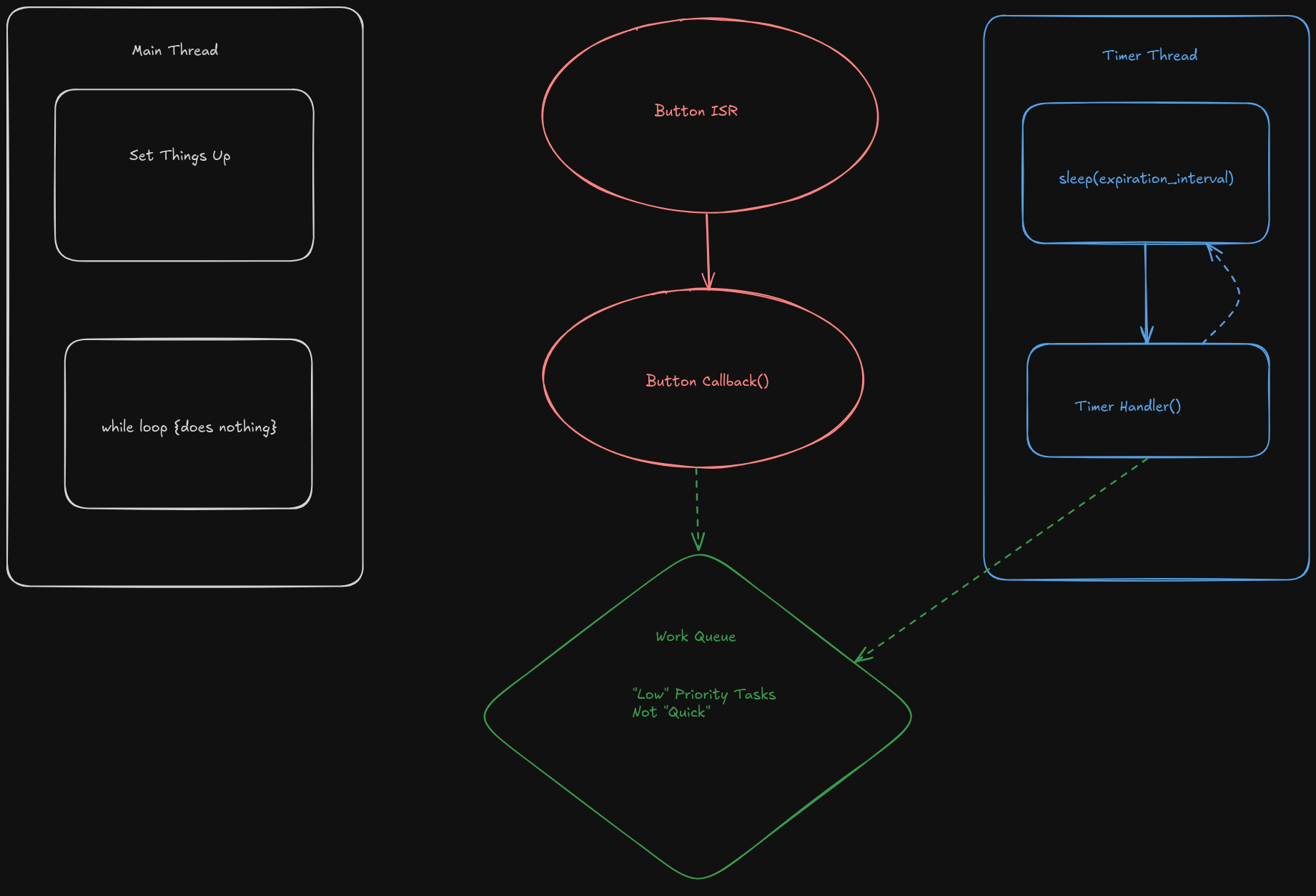
Work Queues
What is a Work Queue?
- A work queue is a way to execute a function when the system is not busy.
- Work queues are managed by the kernel (system).
- System work queue exists by default (no need to include libraries or enable kernel options).
- User can create additional work queues, but need to be defined and initialized.
How Work Queues Help Us
- Callbacks and handler functions associated with ISRs and timers should not consume significant resource / take much time to execute.
- Pro: Work queues allow us to execute functions that may take longer to execute.
- Con: The specific timing of the execution of the function is not guaranteed.
- No longer need to test for Boolean variables in the main loop to determine when to execute a function.
Pseudo-Code
/* declare work queue handler function */
void blink_timer_work_handler(struct k_work *timer_work);

/* define a work queue to associate with the handler function */
K_WORK_DEFINE(blink_timer_work, blink_timer_work_handler);

/* in your timer callback function, submit your task to the work queue */
void blink_timer_handler(struct k_timer *blink_timer){
    k_work_submit(&blink_timer_work);
    LOG_INF("Submitted blinking work to the queue! (%lld)", k_uptime_get());
}

/* define the work queue handler function */
void blink_timer_work_handler(struct k_work *timer_work) {
    LOG_INF("Doing blink work! (%lld)", k_uptime_get());
    gpio_pin_toggle_dt(&led_blink);
    k_msleep(WORK_QUEUE_NAP_TIME_MS);
    LOG_INF("Took a nap... just woke up. (%lld)", k_uptime_get());
}
Example Code
#include <zephyr/kernel.h>
#include <zephyr/drivers/gpio.h>
#include <zephyr/logging/log.h>

LOG_MODULE_REGISTER(main, LOG_LEVEL_DBG);

#define MAIN_SLEEP_TIME_MS   100000
#define BLINK_TIMER_INTERVAL_MS 500
#define WORK_QUEUE_NAP_TIME_MS 10
#define ONESHOT_DURATION_MS 10000

static const struct gpio_dt_spec led_blink = GPIO_DT_SPEC_GET(DT_ALIAS(led0), gpios);
static const struct gpio_dt_spec led_oneshot = GPIO_DT_SPEC_GET(DT_ALIAS(led1), gpios);

void blink_timer_handler(struct k_timer *blink_timer);
void blink_timer_stop(struct k_timer *blink_timer);
void oneshot_timer_handler(struct k_timer *blink_timer);
void blink_timer_work_handler(struct k_work *timer_work);

K_TIMER_DEFINE(blink_timer, blink_timer_handler, blink_timer_stop);
K_TIMER_DEFINE(oneshot_timer, oneshot_timer_handler, NULL);
K_WORK_DEFINE(blink_timer_work, blink_timer_work_handler);

int main(void)
{
    int ret;

    if (!gpio_is_ready_dt(&led_blink)) {
        return -1;
    }

    ret = gpio_pin_configure_dt(&led_blink, GPIO_OUTPUT_ACTIVE);
    if (ret < 0) {
        return -1;
    }
    ret = gpio_pin_configure_dt(&led_oneshot, GPIO_OUTPUT_ACTIVE);
    if (ret < 0) {
        return -1;
    }

    k_timer_start(&blink_timer, K_MSEC(BLINK_TIMER_INTERVAL_MS), K_MSEC(BLINK_TIMER_INTERVAL_MS));
    k_timer_start(&oneshot_timer, K_MSEC(ONESHOT_DURATION_MS), K_NO_WAIT);

    while (1) {
        k_msleep(MAIN_SLEEP_TIME_MS);
    }

    return 0;
}

void blink_timer_handler(struct k_timer *blink_timer){
    k_work_submit(&blink_timer_work);
    LOG_INF("Submitted blinking work to the queue! (%lld)", k_uptime_get());
}

void blink_timer_stop(struct k_timer *blink_timer){
    LOG_INF("Stopping the blinking LED.");
    gpio_pin_set_dt(&led_blink, 0);
}

void blink_timer_work_handler(struct k_work *timer_work) {
    LOG_INF("Doing blink work! (%lld)", k_uptime_get());
    gpio_pin_toggle_dt(&led_blink);
    k_msleep(WORK_QUEUE_NAP_TIME_MS);
    LOG_INF("Took a nap... just woke up. (%lld)", k_uptime_get());
}

void oneshot_timer_handler(struct k_timer *oneshot_timer) {
    LOG_INF("Turn oneshot LED off (%lld)", k_uptime_get());
    gpio_pin_set_dt(&led_oneshot, 0);
}
High-level Flow Chart